The Attention history report provides an overview of heat detection attentions over a selected period.
Use this report to review past heat attentions and analyze reproductive performance.
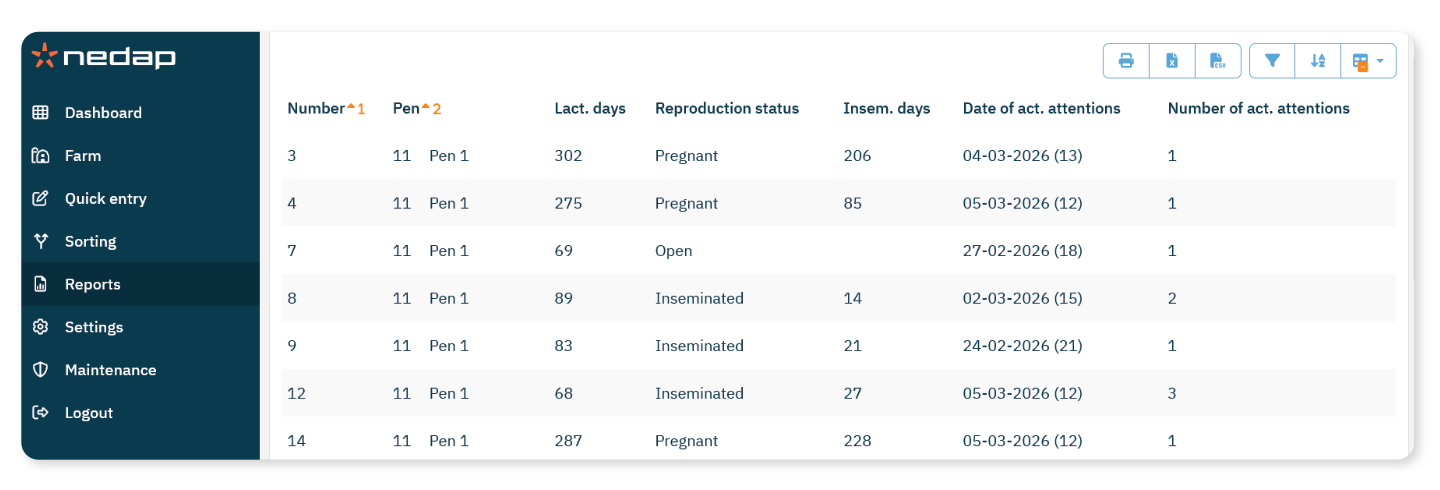
How to View the Report
Select Reports from the menu.
Under Heat detection, select Attention history.
In the selection screen, choose the desired Period (for example, Last month or Last 3 months).
Select OK.
What the Report Shows
For each animal, the report shows:
Number: Animal number
Pen: Current pen
Lact. days: Days in lactation
Reproduction status: Current reproduction status (for example: Open, Inseminated, Pregnant)
Insem. days: Days since insemination
Date of act. attentions: Date of the most recent heat attention
Number of act. attentions: Total number of heat attentions during the selected period
