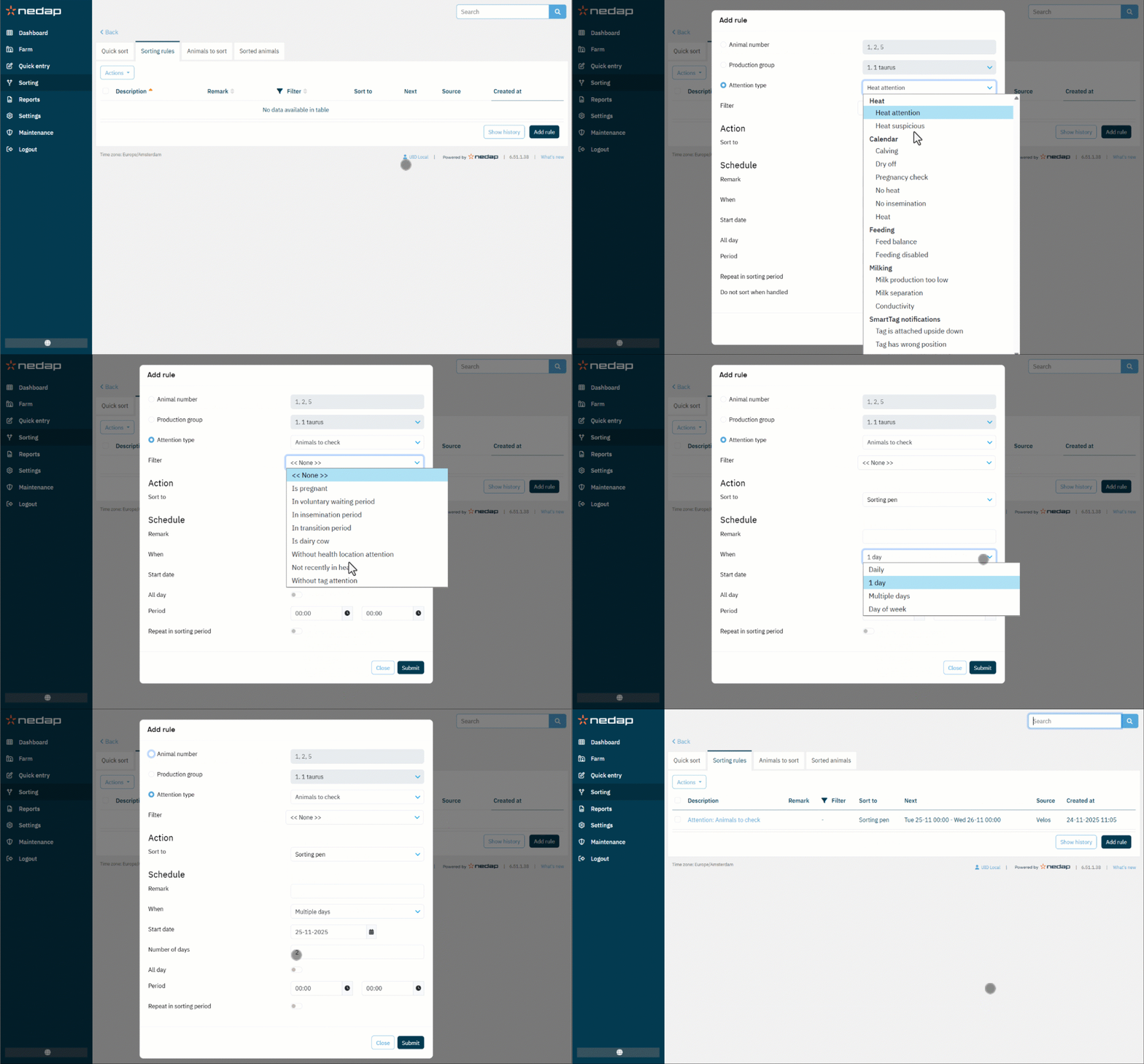
Use Sorting rules to automatically sort animals based on their attentions, production group or animal number. This allows for consistent and hands-free sorting. Any animal that meets the criteria of an active sorting rule will be sorted automatically.
Create a Sorting Rule
To create a sorting, follow these steps:
- Select Sorting from the menu.
- Select the Sorting Rules tab.
- Select on Add rule.
- Select the condition for the sorting rule:
- Animal number: Enter the animal numbers to sort.
- Production group: Select the production group to sort.
- Attention type: Select one of the attention types, animals with this attention will be sorted. If desired, you can add a filter to further define which animals will be sorted.
- When multiple sorting options are set up, select the desired sorting option.
- Fill in the sorting schedule:
- Remark (optional): Add notes or a description for this rule.
- When: Select when the animals must be sorted: daily, 1 day, multiple days (also enter the number of days) or day of the week (also select the day of the week).
- Start date: Date from when the sorting has to start
- All day: If enabled, the sorting is active all day. Deselect to enter a time frame for the sorting to be active.
- Repeat in sorting period: Enable this to sort an animal every time it passes the sorting gate within the sorting period.
- Do not sort when handled (only visible for certain attentions): Enabling this causes an animal not to be sorted when handled.