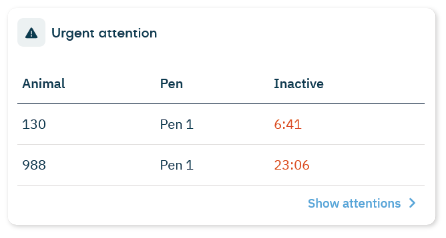
The Urgent attention tile on the dashboard shows animals that require immediate action. An urgent attention appears when inactive behavior continues for too long. Use this tile to quickly identify animals that need to be checked as soon as possible.
What You See on the Tile
On the dashboard, the Urgent Attention tile shows:
- Animal: Animal number
- Pen: The current pen the cow is in.
- Inactive: Duration of inactivity
- Show attentions: Opens the more detailed Urgent Attention page.
The inactive value is shown in red and indicates how long the animal has been inactive.
For example, 9:55 means the animal has been almost completely inactive for 9 hours and 55 minutes.
NoteThe urgent attention remains visible as long as the abnormal behavior continues.
