Apply Feed Corrections

Modified on Mon, 30 Mar at 10:57 AM

You can apply a temporary correction to a feed plan. Use this option when feed requirements change suddenly, for example due to weather conditions or changes in intake.

A correction affects all animals assigned to the selected feed plan.
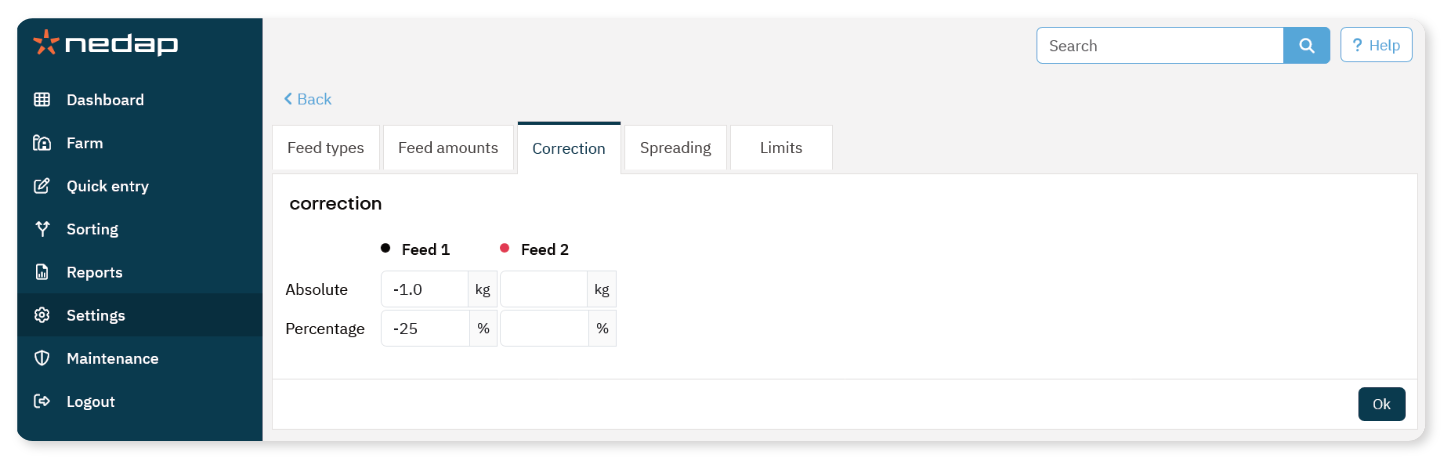


Apply a Correction

  1. Select Settings from the menu.

  2. Under Feeding, select Feed plans.

  3. Select the feed plan you want to adjust.

  4. Open the Correction tab.

  5. Select the correction type:

    • Absolute: Add or subtract a fixed amount (kg).

    • Percentage: Add or subtract a percentage (%).

  6. Enter the correction value per feed type.

    • Use a minus sign (-) to reduce the feed amount.

  7. Select Ok.

The correction becomes active after the next feed start. 


Example

If the current daily feed amount is 4 kg:

  • Absolute correction of -1 kg results in 3 kg per day.

  • Percentage correction of -25% results in 3 kg per day.


Note

Corrections are applied to all animals in the selected feed plan.

Use corrections carefully to avoid underfeeding or overfeeding.

Was this article helpful?

That’s Great!

Thank you for your feedback

Sorry! We couldn't be helpful

Thank you for your feedback

Let us know how can we improve this article!

Select at least one of the reasons
CAPTCHA verification is required.

Feedback sent

We appreciate your effort and will try to fix the article

category image

Velos webhelp

Open navigation