The Animals to check page helps you monitor animal well-being by detecting behavioral changes that may indicate health issues. The list uses SmartTag data to detect changes early, so you can act in time.
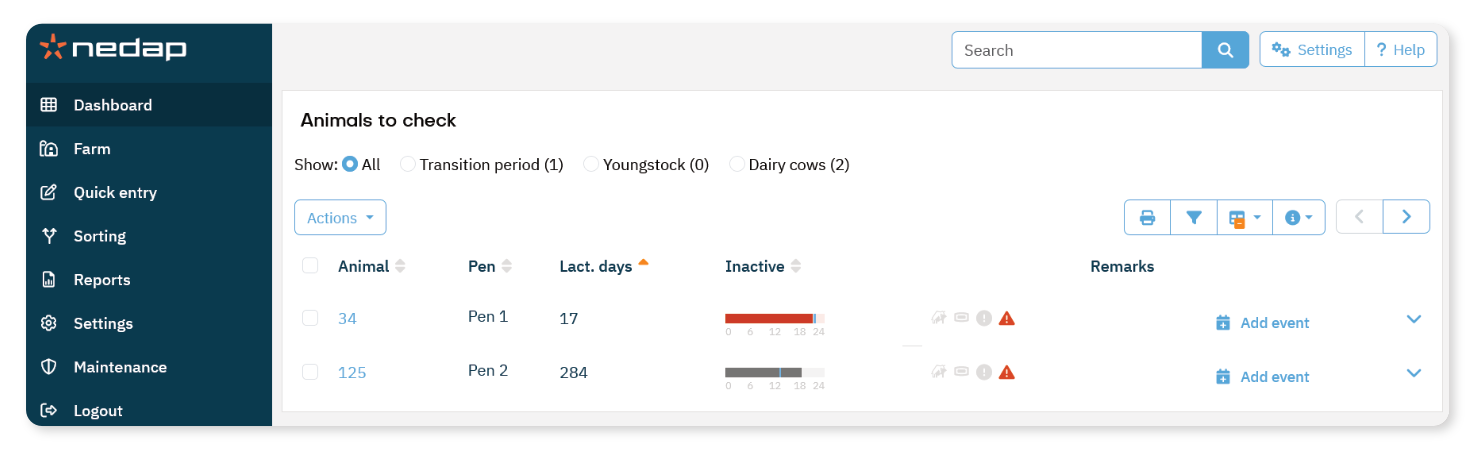
What you See in the List
For each animal, you see their:
Animal number
Pen
Inactive time
Remarks
Inactive Time
The inactive bar shows how long the animal has been inactive.
The colored bar represents the current inactive duration.
The thin blue vertical line indicates the normal average value for that animal.
The bar turns red when the inactive duration deviates significantly from the normal pattern.
How to use the Animals to Check Page
Focus on the following information:
- Inactive time: Review whether the value is within the normal range.
- View more details.
- Select the arrow icon
 to check the behavior pattern of the animal.
 - Select the animal number to open full animal details.
After reviewing the animal, follow your farm’s health protocol.
For step-by-step instructions on what to do after receiving an attention, see Handle animals with an Animals to check attention.
Icons in the Animals to Check Page
Icons next to the animal number provide additional information:
| Icons |
 | Recently been in heat The animal was recently in heat. This may explain the change in behavior. |
 | SmartTag not working properly The SmartTag may not be working correctly. This can affect the activity data. |
 | Group alerts The same attention is shown for multiple animals. This may indicate a group-related issue. |
 | Urgent attention
The animal is showing, or has been showing, abnormal behavior for an extended period. |
