 to confirm the animal was trimmed. Trims can also be imported via the supported data connectors.
 remove the animal from the Active tab. The animal will not show on the list for the following 30 days.
  to add the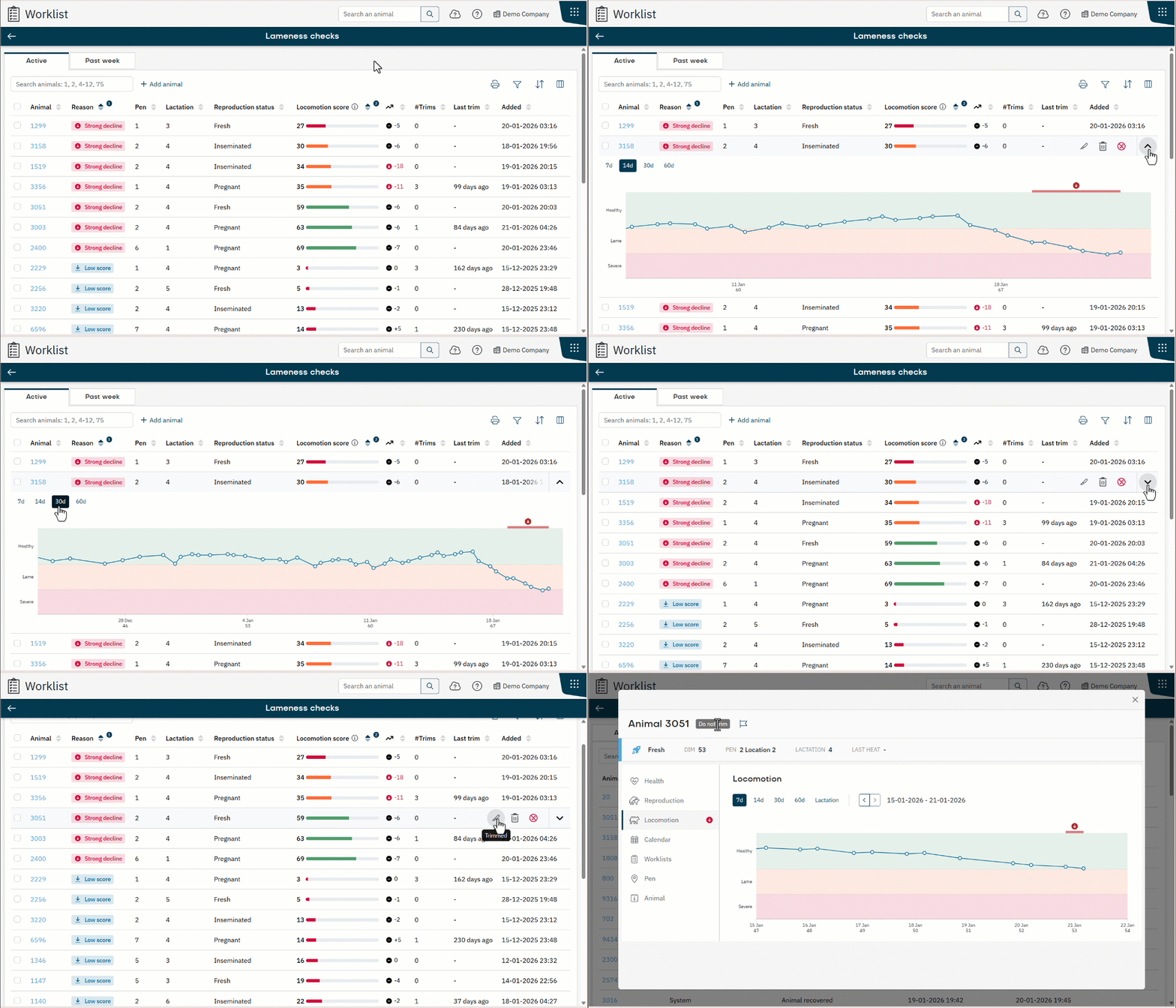

Nedap Now webhelp
-
Nedap Now webhelp
- Migrating to Nedap Now
- Nedap Now - Getting Started
- Nedap Now - Home
-
Nedap Now - Worklist
-
Nedap Now - Worklist Essentials
- Manually Add an Animal to a Worklist
- When and Why Animals Appear on the Past Week Tab
- Add an Animal Back to the Active Tab
- Change the Sort Order in a Worklist
- Customize Columns in a Worklist
- Filter a Worklist
- Overview of Filter Operators
- Overview of Filters and Columns
- Print a Worklist
- View Animals at a Wrong Location
- View Life Numbers in Worklists
-
Nedap Now - Health Checks Worklist
- Understand the Health Checks Worklist
- Use the Health Graph to Analyze Animal Behaviour
- Understand the Health Score Graph
- When Do Animals Appear on the Health Checks Worklist?
- Handle Animals in the Health Checks Worklist
- Customize the Health Graph
- Control when Animals Appear in the Health Checks Worklist
- You Cannot Remove Animals with Urgent Health Checks
-
Nedap Now - In Heat Worklist
- Understand the In Heat Worklist
- Handle Animals on the In Heat Worklist
- Understand Reproductive Data Using the Reproduction Graph
- Use the Heat Score to Identify Animals in Heat
- Control When Animals Appear on the In Heat Worklist
- Adjust the Heat Score Sensitivity
- Use the Optimal Insemination Moment to Time Insemination
- Understand the Insemination Window for Sexed Semen
- Customize the Insemination Window for Sexed Semen
- Adjust Pen-Based Correction for Heat Detection
- Nedap Now - To Inseminate Worklist
- Nedap Now - Reproduction Checks Worklist
- Nedap Now - On Different Location Worklist
- Nedap Now - Lameness Checks Worklist
- Nedap Now - Dry Off Worklist
- Nedap Now - Calving Worklist
- Nedap Now - SmartTag Issues Worklist
- Nedap Now - Custom Worklist
-
Nedap Now - Worklist Essentials
-
Nedap Now - Cow
- Use Quick Entry
- Use the List of Animals
- Import Animals Using a CSV File
- Manually Add an Animal to the System
- View and Update Animal Details
- Add a Calendar Event
- Edit a Calendar Event
- Delete a Calendar Event
- Change Pen for an Animal
- Change Registration Details for an Animal
- Delete an Animal from the System
- Analyze Milking Data with the Milking Graph
- Find Animals Quickly with View on Map
- Create and Use Animal Flags
-
Nedap Now - Herd
- Understand the Herd Dashboard
- Monitor Daily Behavior of The Herd
- Identify Group-Level Changes in Herd Performance
- Use the Patterns Tab to Detect Shifts in Herd Behavior
- Monitor Fertility After Calving
- View Heat Stress Levels in Your Herd
- Analyze Group Behavior Trends with the Behavior Graph
- Add Context to Performance Trends with Notes
- Edit or Delete a Note
- View Pen Analytics to Find Pen Mismatches
- Monitor Transition Periods
- Monitor Lameness Trends in the Herd
- Understand the Seasonal Insemination Results
- Nedap Now - Reports
-
Nedap Now - Tag
- Understand the Tag app
- Add SmartTags to the System
- Overview of All Tags
- View Tag Usage and Billing by Month
- Link SmartTags to Animals
- Manually Link SmartTags to Animals
- Link SmartTags to Animals Using NFC
- Link SmartTags to Animals Using QR Codes
- Delete a SmartTag from the System
- Manage Tag Notifications Settings
- Transfer a Tag to Another Animal
- Nedap Now - Sorting
- Nedap Now - Settings
- Nedap Now - Data Connector
- Nedap Now - Mobile app
- Nedap Now - Payment and Invoicing
- Nedap Now - Manage Your Account
- Nedap Now - Manage a Company